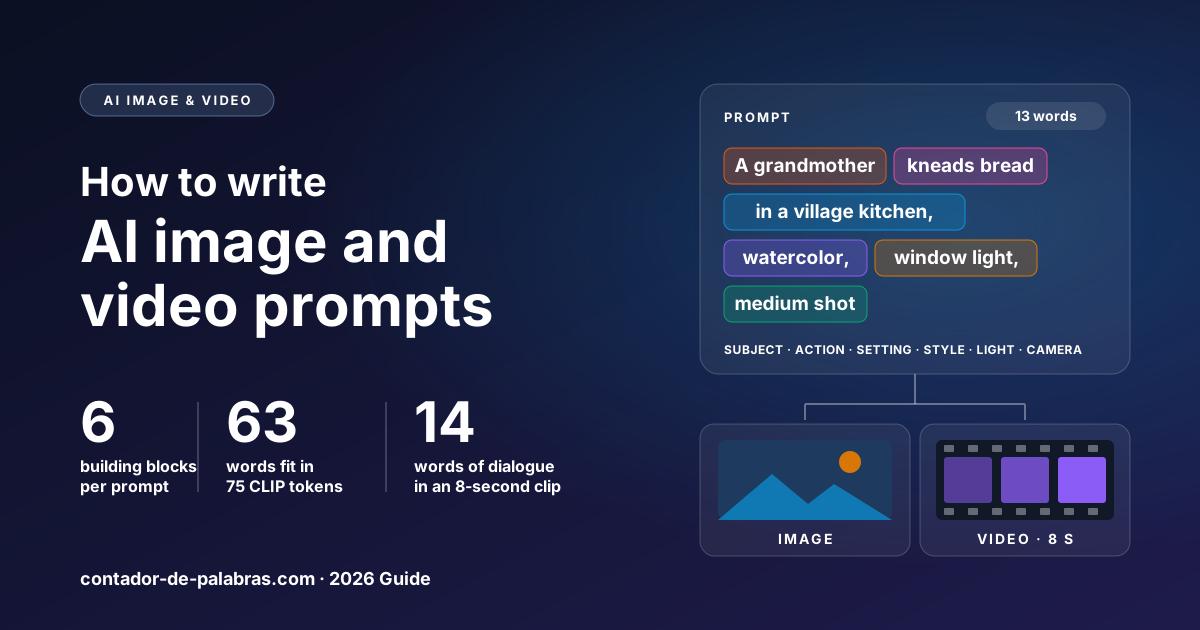
Most prompt advice still carries rules from 2022, when image models could read about one sentence. This guide covers what a good AI image or video prompt contains today, how many words to use, where the famous 75-token limit came from (and which models it still applies to), and how to budget dialogue when the model generates sound.
A good prompt describes subject, action, setting, style, light and camera, in that order, in 15 to 60 words for an image and 40 to 90 for video. Write full sentences, not keyword lists. The 75-token limit only applies to models that read prompts through CLIP (Stable Diffusion 1.5 and SDXL), where it works out to about 63 English words. For dialogue, budget about 14 words per 8-second clip.
Anatomy of a prompt: six building blocks
The most reliable way not to forget anything is to treat the prompt as six questions, in this order: who, doing what, where, what it looks like, in what light, and seen from where. This is not a made-up template: Google's official Veo prompt guide breaks prompts into the same elements (subject, action, context, style, camera and lighting) and adds audio for video.
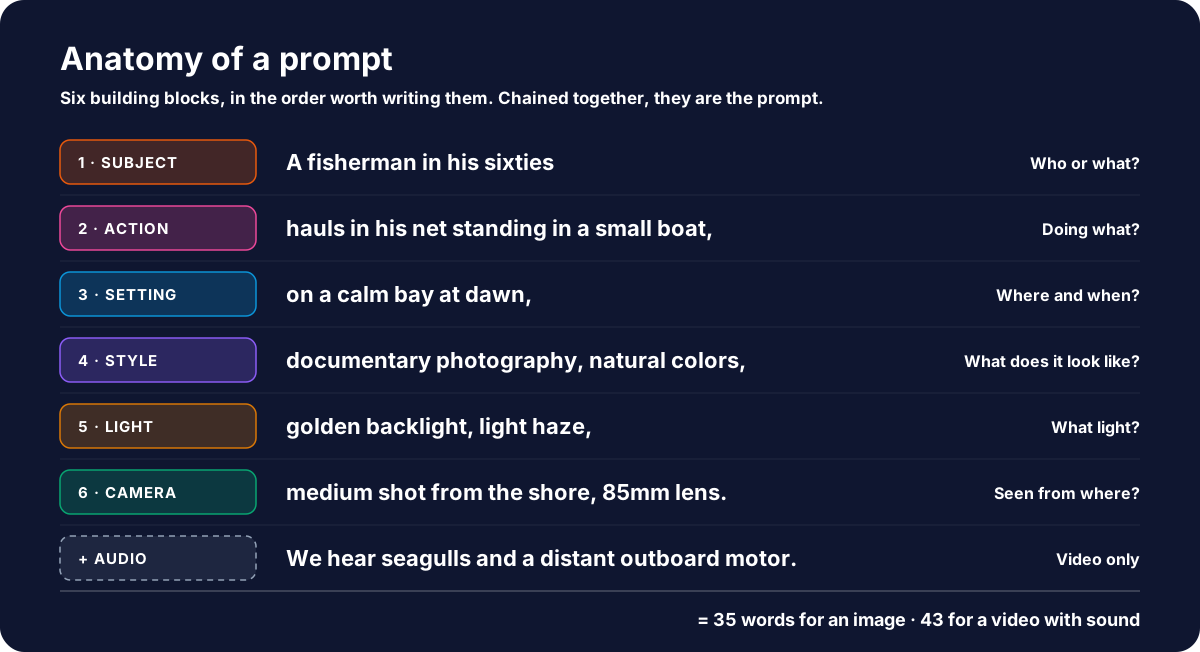
- Subject. Describe what the camera can see, not what you know. "A fisherman in his sixties wearing a wool cap" works; "a very experienced fisherman" does not, because experience cannot be photographed.
- Action. One main verb. In a still image the action sets the pose; in a video it is what happens during the clip.
- Setting. Place and time together: "on a calm bay at dawn" handles the background and the hour at once.
- Style. The medium (documentary photography, watercolor, 3D render, flat vector illustration) does more than adjectives like "beautiful" or "stunning", which describe nothing.
- Light. Direction and quality: backlight, side light from a window, harsh midday sun, blue hour.
- Camera. Shot type (wide, medium, close-up), angle (high, low) and, if it matters, the lens: "85mm lens", "wide angle".
Why this order? Because what you write first is what survives. Models with a hard text limit, such as the ones built on CLIP, cut from the end: if the prompt runs long, you lose the lighting and the camera, not the subject.
Where the 75-token rule came from
Models do not read words; they read tokens, pieces of words from a fixed vocabulary. "Mountain" is one token; a rarer word may be three or four. The "keep it under 75 tokens" rule you still see in forums and tutorials comes from one specific text encoder:
- CLIP, the text encoder in Stable Diffusion 1.5, 2.x and SDXL, reads at most 77 tokens: 75 usable plus a start and an end marker. Anything past that is truncated. In our measurement an English word averages 1.19 CLIP tokens, so the limit is about 63 words.
- T5, the text encoder used by Flux, takes 512 tokens in its default configuration.
- OpenAI's image API accepts prompts of up to 32,000 characters.
With limits like these, the ceiling is no longer the model. It is attention: every extra adjective competes with the important ones, and a 200-word prompt usually contradicts itself somewhere (asking for "soft light" at the start and "hard shadows" at the end). For reference, the examples in Google's Veo guide are 55 and 62 words long. These are the ranges we recommend:
| Prompt type | Words | What to prioritize |
|---|---|---|
| Simple image (one object, one style) | 15 – 30 | Subject, style, background |
| Scene or portrait | 30 – 60 | All six blocks |
| Video without dialogue (one 5–8 s shot) | 40 – 70 | Action and camera movement |
| Video with dialogue and sound | 50 – 90 | Short dialogue, sound in its own sentences |
| CLIP-based models (SD 1.5, SDXL) | ≤ 60 | Essentials first: the rest gets cut |
To see where your prompt lands, paste it into the word counter. If your tool limits characters instead of words, the character counter gives you the exact figure, spaces included.
Keyword lists vs. full sentences
The 77-token ceiling also explains the strange dialect of early prompts: "portrait, woman, red dress, masterpiece, 8k, trending on artstation". CLIP learned from 400 million image-text pairs collected on the web, mostly short captions and alt text, and people squeezed as many concepts as possible into a tiny budget.
The problem with a keyword list is that it cannot express relationships. "Red, cube, blue, sphere" does not say which object is red or which one sits on top; "a red cube resting on a blue sphere" does. Current models are built to read grammar, so give them sentences. Google's own Veo examples read like a short paragraph from a screenplay, not like a list of tags.
Non-English prompts pay a token tax
If you write prompts for Spanish- or Portuguese-speaking audiences, or simply think in another language, the CLIP limit shrinks. We ran 12 parallel prompts (the same content in English, Spanish and Portuguese) through the official CLIP tokenizer from OpenAI's repository, checked first against its published token IDs.
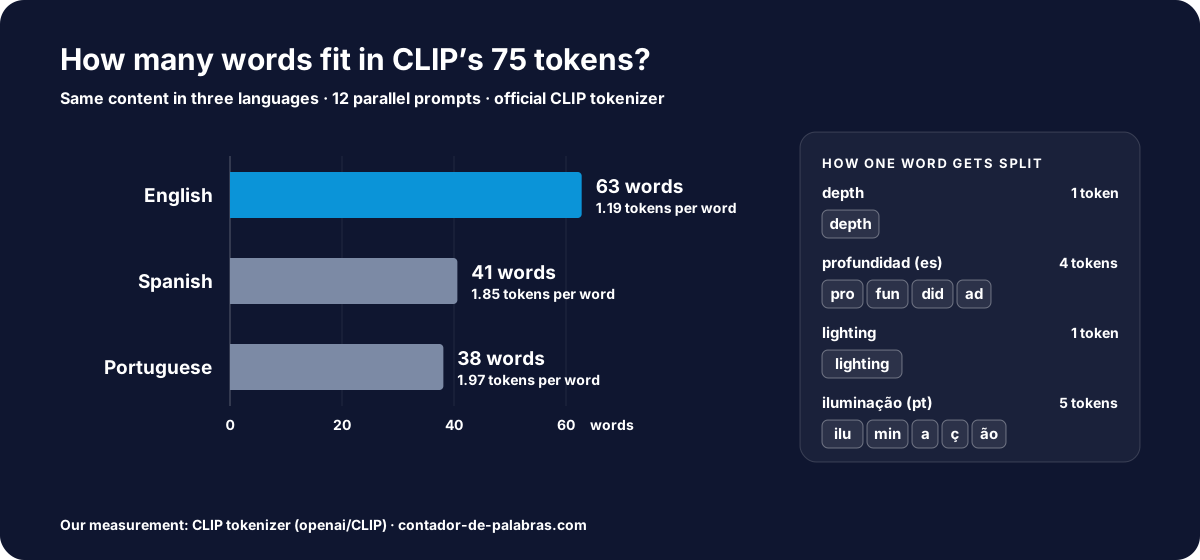
English averaged 1.19 tokens per word, Spanish 1.85 and Portuguese 1.97. The same prompt costs 1.66 times as many tokens in Spanish and 1.75 times in Portuguese, so the 75 usable tokens hold about 63 English words, 41 Spanish and 38 Portuguese. The reason is the vocabulary, not the languages: "depth" is a single token, while the Spanish "profundidad" is split into four and the Portuguese "iluminação" into five. The data explains the vocabulary. LAION-5B, the public dataset many open models were trained on, holds 5.85 billion image-text pairs, 2.3 billion of them in English and 2.2 billion spread across more than a hundred other languages.
The practical takeaway: on CLIP-based models, write in English or keep non-English prompts short. Models built on large language models, such as Google's Nano Banana or OpenAI's GPT Image, are trained on many languages and do not have this squeeze.
Video prompts: motion, camera and sound
A video prompt is an image prompt with time added. Everything above still applies, plus three questions: what moves, how the camera moves and what we hear.
- One main action per clip. Current models generate clips of 4 to 15 seconds. That is enough for one gesture or one movement, not three chained actions. If you need more, generate several clips and edit them together.
- Name the camera move. Google's Veo guide uses standard film vocabulary: static shot, pan, tilt, dolly (the camera physically moves closer or away), truck, crane, handheld, arc shot. "The camera slowly dollies in" is more precise than "dynamic shot".
- Sound in its own sentences. Google recommends describing audio in separate sentences: sound effects ("a phone ringing"), ambient noise ("distant traffic and sirens") and dialogue.
- Dialogue after a colon. The official examples name the speaker, then write the line after "says:". Add accent and tone when they matter. Google's guide does exactly that with "a voiceover with a polished British accent"; "a tired American accent" or "a soft Scottish voice" work the same way.
- Negative prompts without "no". If the model takes a negative prompt, list what you do not want ("wall, frame") instead of writing "don't show walls".
How much dialogue fits in a clip
This is where a word count earns its place. A natural voiceover runs at 130–150 words per minute, or 2.2 to 2.5 words per second. But a clip is not all dialogue: the shot needs a moment to open and close. Leaving a second and a half of margin and calculating at 130 words per minute gives these budgets:
| Clip length | Comfortable dialogue | Ceiling (150 WPM) |
|---|---|---|
| 5 seconds | ~7 words | 12 |
| 8 seconds (one Veo 3.1 clip) | ~14 words | 20 |
| 10 seconds | ~18 words | 25 |
| 15 seconds | ~29 words | 37 |
If the line does not fit, do not ask for faster speech. Cut the line or split it across two clips. A rushed eight-second clip is the quickest way to make AI dialogue sound synthetic.
Text inside the image
Posters, thumbnails and cover art with lettering are where model quality shows most. Three rules save attempts:
- The exact text, in quotation marks, and where it goes. 'Bold headline at the top that reads "Fresh Bread Every Morning"' leaves far less room for error than "a bakery poster with a slogan".
- Keep it short. Every extra word is another chance for a misspelling. Keep headlines to five or six words and add longer copy afterwards in an editor.
- Decide the capitalization before you prompt. The model will copy whatever casing you type, so type the final version. If the line is a headline, run it through the title case converter first so you are not left choosing between "Every" and "every" after the image is generated.
If the text is still wrong after three or four attempts, change tactics: generate the image with empty space where the text would go and add the lettering yourself. It is faster than chasing a perfect spelling.
Test the same prompt on several models
When a result misses, the instinct is to rewrite the prompt. First rule out the other possibility: the prompt is fine and the model is the wrong one. Each model has its own temperament. Some follow long descriptions to the letter, others excel at lettering, others at camera movement, and the same 40-word prompt can come out perfect on one and wrong on another.
That check is cheap when the models live in one place. An AI image and video generator like Anyscene puts image models such as Nano Banana Pro, GPT Image 2.5, Seedream 5.0 and Flux 2 next to video models such as Kling 3.0, Seedance 2.5 and Veo 3.1 on a single credit balance, so running the same text on three models means changing one dropdown. New accounts get free credits to start. If your image includes text, put a typography-focused model in the round; if it is a video with dialogue, include one that generates sound.
The method that works best:
- Freeze the prompt and run it unchanged on three models.
- If all three fail the same way, the problem is the prompt: change one building block and repeat.
- If only one fails, keep the one that gets it right and leave the text alone.
- Save every version with its word count. After a few weeks you will see which length range works best for your prompts.
Three templates to copy
Each one follows the six-block order and sits inside its range. Swap the details, keep the structure.
Look at the dialogue in the third example: two words in a clip that could hold fourteen. A short line lets the gesture and the sound do the rest, and it almost always plays more naturally than filling all eight seconds with speech.
Frequently asked questions
How many words should an AI image prompt be?
What is the 75-token limit?
Should I write prompts as keywords or full sentences?
How much dialogue fits in an 8-second AI video?
How do I get AI to spell the text in an image correctly?
What is a negative prompt?
Related tools and articles
Word Counter
Measure your prompt length.
Open →Anyscene
AI images and video across many models.
Try it →Title Case Converter
Fix headline casing first.
Open →Words per minute of audio
The pace behind dialogue.
Read →Next: how many words is a minute of audio · social media character limits · how to write a short story.